
Wan 3.0 Prime: Prepare Reference Images for a Music-Video Shot
Prepare Wan 3.0 Prime references by separating character, setting and shot intent, then plan the cut around a chosen musical moment.
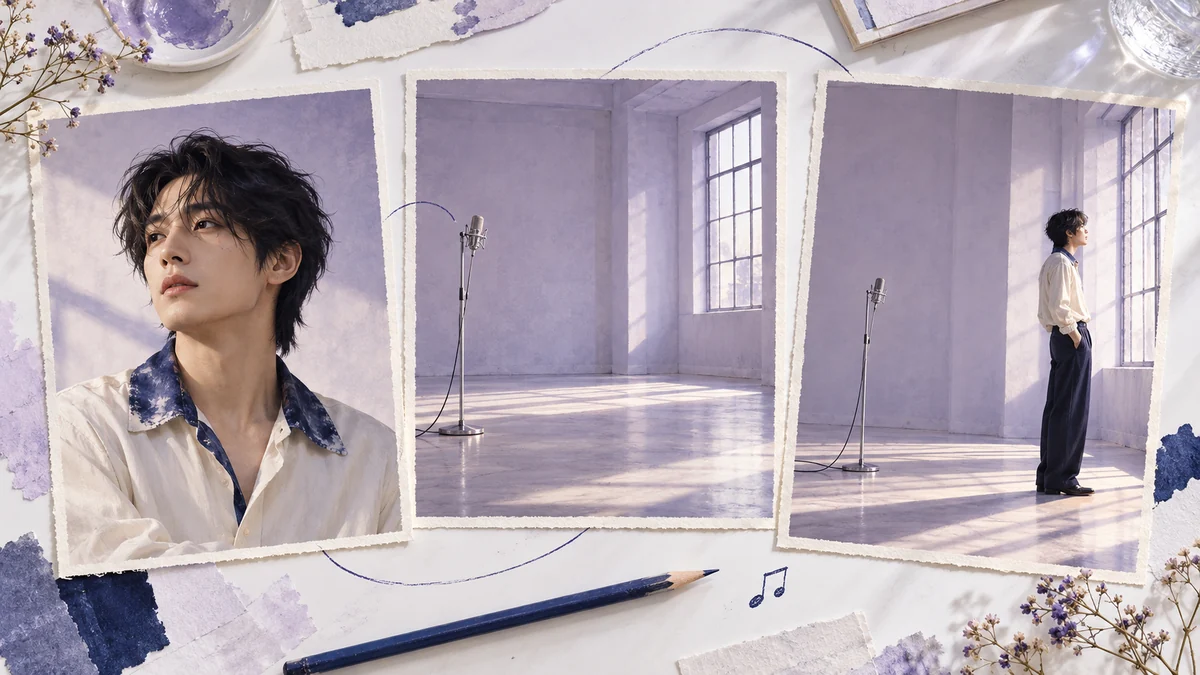
Three attractive pictures can describe three different videos. One has the singer you want, another has a beautiful room, and the third has a camera angle worth borrowing. Unless you decide what each picture contributes, you have handed the model a set of competing suggestions. A music-video reference pack needs a short brief as much as it needs good images.
Alibaba Cloud's Wan 3.0 Prime documentation describes reference-image video generation. This article plans a shot around that input idea; it does not report a Wan generation test. Raindance AI has not integrated Wan 3.0 Prime.
Pick the musical moment before the reference pack
Use a simple example: an adult singer in an empty rehearsal room looks away from a microphone as a vocal phrase ends. The point of the shot is the pause after singing. A sweeping orbit or several dramatic gestures could compete with it. A restrained side view gives the editor a clean moment to hold before the next cut.
Write down where the shot belongs in the music. If the excerpt is a steady 100 BPM in 4/4, each beat lasts 0.6 seconds and two bars take 4.8 seconds. That is a useful target edit length, not a duration setting to assume exists in the generator. Check the tool's actual controls and plan to trim the result.
Give each image one job
Start with an original or permitted portrait that clearly shows the person and wardrobe you intend to preserve. For this example, choose a plain cream shirt with an indigo collar and a clear three-quarter view. Keep that picture responsible for identity and clothing. If the background is busy, select another usable portrait rather than asking the prompt to disentangle several people.
Make the setting reference an empty lavender rehearsal room with a microphone stand by a tall window. Leaving people out makes its role easier to describe. The window tells you where the light comes from, while the microphone gives the performer something concrete to look away from. Avoid an environment photograph whose main attraction is another performer's face.
The third image can propose the composition: a side view, microphone on the left, performer on the right, and enough breathing room above the shoulders. It is a framing study, not a second identity. Where possible, create it using the same original character. Do not assume a provider interprets numbered images, priority or prompt aliases in the same way as another tool. Read the selected mode's reference instructions first.
Turn the pack into a shot brief
A workable planning note would say: “Use the portrait for the adult singer and cream shirt with indigo collar. Use the empty room for the window, lavender walls and microphone position. Use the side-view study for framing. The singer stands beside the microphone, lowers their chin slightly and looks toward the window. Keep the camera steady; end on a quiet held pose.”
This is plain-language shot planning, not an API payload or a tested prompt. These three cards are planning materials, not a claim that every Wan mode accepts three image uploads. For a precise starting composition, consider first-frame or first-and-last-frame input; the official model release page separates those from Omni reference. Choose one mode per attempt. Three planning images do not guarantee the camera framing. Map the roles to the actual controls available. If a mode accepts fewer images, simplify the pack. Do not silently replace a character reference with a room image just because both are attractive. Keep a copy of the brief and the input files so a later revision changes one decision at a time.
Notice what the note leaves out. It does not ask for an exact melody, lyrics, automatic lip sync or a cut on a particular beat. Those are separate requirements. A convincing silent gesture can work well beneath a song without making the generated person appear to perform every word.
Review the turn, then build the edit
Look at the start, the turn and the final pose, then watch the full clip. Check the collar, face and microphone across the movement. A microphone changing sides or passing through the singer is more distracting than a slightly imperfect wall texture. Choose a usable section with a little stillness at both ends; do not let the last frame of the render dictate the musical cut.
In your editor, place the end of the vocal phrase first. Slide the chosen shot until the look toward the window supports that moment. Trim to the phrase, leaving a short hold if the music gives it space. If the useful action is too short, another insert may help more than slowing a face movement unnaturally. Our four-shot Anijam planning exercise shows one way to use an object close-up between two character shots.
Keep the generation choice separate from the scene choice
If your real goal is a ready-defined portrait performance, you can inspect our Raindance scenes instead. They use their own scene instructions and available controls; they are not a way to run the Wan reference pack above. The fixed-song MV is also a different workflow, rather than an editor for any soundtrack you supply.
Written by the Raindance AI editorial team. Documentation checked October 22, 2026. Availability, input controls and commercial terms should be checked with the provider before a paid attempt.