
Anijam AI: Plan a 16-Second Animated Music Video
Plan an Anijam animated music video in four manageable shots, with a 120 BPM timing example and a practical edit plan.
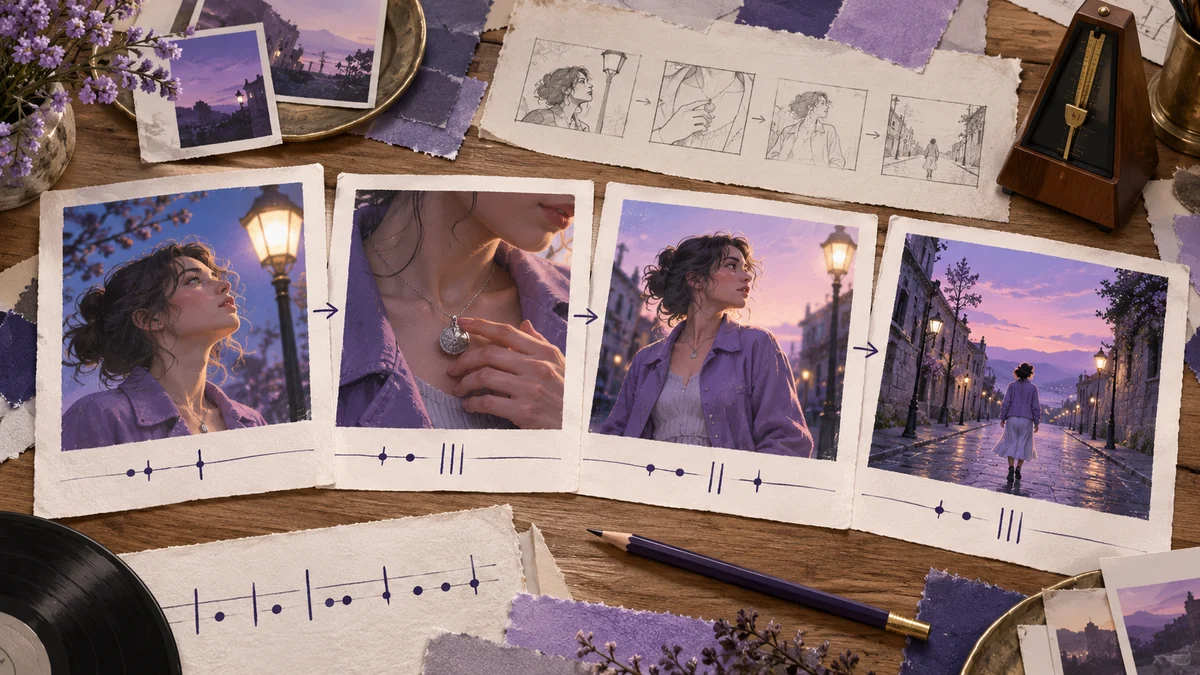
A song gives you pace before it gives you a story. That is why a useful first step with an AI animation maker is to choose the exact excerpt and listen for a change: a vocal entrance, a held note, a drum fill. Build the picture around one of those moments. Asking for “a cinematic music video” leaves almost every editorial decision unresolved.
Anijam describes animation workflows from prompts, images or scripts; its video editor page describes editing scenes. This guide is an original planning exercise, not a hands-on Anijam review. Raindance AI does not provide an Anijam integration.
Give sixteen seconds one small story
For an example, imagine an adult character waiting beneath a streetlamp, touching the pendant at her collar, then deciding to walk away. Her lavender jacket and silver pendant give you two concrete things to preserve between shots. The decision to leave gives the ending a purpose. You do not need a second location, a flashback or a crowd to make the sequence feel finished.
Write that story as a sentence before writing any generation prompts. If the sentence needs several explanations, narrow it. A short music excerpt cannot carry every detail of a larger plot, and animation does not remove the need for a readable beginning and end.
Count the excerpt before dividing the shots
At 120 BPM, each beat lasts half a second. In 4/4 time, one bar takes two seconds, so eight bars take sixteen seconds. That gives this example four two-bar sections, each four seconds long. The calculation assumes a steady tempo and a chosen excerpt that starts on a bar line; an introductory pickup or tempo change needs a different map.
| Edit position | Bars | Picture to plan | What changes |
|---|---|---|---|
| 0–4 seconds | 1–2 | Medium shot beneath the streetlamp | Her hand reaches toward the pendant |
| 4–8 seconds | 3–4 | Close-up of hand and pendant | The fingers stop moving |
| 8–12 seconds | 5–6 | Medium profile as she turns toward the light | She makes the decision to leave |
| 12–16 seconds | 7–8 | Wide shot of the street | She takes a few steps away |
These are target positions in the final edit, not promises about a model's timing. If the music asks for a cut halfway through a bar, use it. Four equally sized sections are a starting exercise, not a rule that every song should follow.
Write prompts that leave room to cut
Give each shot one action and a clear endpoint. For the opening, a useful brief is: “Medium shot of an adult woman in a lavender jacket beneath a streetlamp at dusk. She slowly lifts her right hand toward a small silver pendant. Keep the framing steady and finish with her hand near her collar.” That is easier to assess than a request containing several locations and a camera spin.
For the close-up, repeat the pendant and jacket details, but describe only the hand action. The face does not need to appear in every shot. An insert can give the edit a breath while reducing how many consecutive shots rely on a perfectly matching face. Keep the light direction and screen direction consistent so the cut feels intentional.
Request enough material to find a clean entrance and exit where the tool allows it. A four-second place in the edit does not necessarily require a four-second generation. Trim a longer usable shot rather than stretching a short one until its movement looks uneven. Check the actual duration controls in the tool you use.
Put the generated shots against the music
Place your selected audio excerpt in a separate editor and mark the bar boundaries. Add the shots underneath, starting with the turn at the musical change you chose. Then work backward to the pendant and forward to the walk. This often makes a stronger sequence than laying four clips down and hoping the interesting movement lands on the beat.
Watch once without sound. Check the jacket, pendant, hand position and direction of travel across the cuts. Then watch with sound and adjust the cut points. A generated shot can suggest a mood; the editor still decides precisely which frame meets a drum hit. This article has not tested Anijam output, and does not assume automatic beat matching.
Choose a shorter route when you only need a performance
If your goal is simply to put two people into a short performance, a four-shot animation plan may be unnecessary. Our photo-led Raindance MV is a separate fixed-song workflow. It is not the custom soundtrack or animated story described here. For original silent performance visuals, browse the scene library and check the scene's inputs before generating.
For a more deliberate reference pack, continue with the Wan 3.0 Prime music-video reference guide. Keep the same small story. Change the way you prepare the shots, rather than adding more plot just because another tool is available.
Written by the Raindance AI editorial team. Sources checked October 22, 2026.